
Sitting for prolonged periods increases spinal pressure. Compare the best ergonomic office chairs based on kinematic lumbar support and pelvic tilt mechanics to alleviate lower back pain.
- PosturFit SL hardware for dynamic lumbar and sacral support customization
- 8Z Pellicle elastomeric mesh with eight distinct zones of tension for pressure relief
- Harmonic tilt mechanism mimics natural body pivot points for balanced motion
Clinical & Performance Insights
Sitting for prolonged periods increases spinal pressure. Compare the best ergonomic office chairs based on kinematic lumbar support and pelvic tilt mechanics to alleviate lower back pain. Our review focuses on professional-grade lumbar support, mesh breathability, and tilt physics.
1. Biomechanical Analysis of Prolonged Sitting and Lumbar Stress
Sedentary work environments subject the human lumbar spine to sustained compressive loads. When sitting without adequate structural support, the natural inward curve of the lower back, known as lumbar lordosis, flattens. This structural shift increases intradiscal pressure at the L4-L5 and L5-S1 vertebral joints by up to 40% compared to standing. Over time, this chronic pressure leads to disc dehydration, micro-tearing of the annulus fibrosus, and nerve compression.
Ergonomic chairs counteract this process by maintaining the pelvis in a neutral position. By supporting the sacrum and lumbar spine, the chair preserves spinal alignment, distributing the body's weight evenly across the intervertebral discs. This stabilization prevents muscle fatigue in the erector spinae, which otherwise occurs when muscles must work constantly to keep the spine upright. Maintaining this posture is critical for preventing long-term degeneration of the lumbar joints.
Furthermore, improper seating postures restrict blood flow to the surrounding spinal musculature. This restriction causes metabolites to accumulate, leading to tissue soreness and chronic spasm cycles. Understanding the biomechanics of sitting is crucial for selecting a seating platform that protects spinal health over decades of use, minimizing the need for physical therapy.
Passive sitting structures fail to adapt to micro-movements throughout the workday. The body requires active support that flexes and recalibrates as you change tasks. High-quality seating systems use materials that distribute weight evenly, reducing pressure points that limit lower-body circulation and cause discomfort during long hours of computer work.
- Maintains lumbar lordosis to prevent L4-L5 disc flattening.
- Reduces sustained muscle fatigue in the erector spinae group.
- Distributes compressive loads evenly across intervertebral discs.
- Prevents localized lactic acid buildup by supporting blood flow.
- Minimizes structural pelvic tilt that leads to nerve impingement.
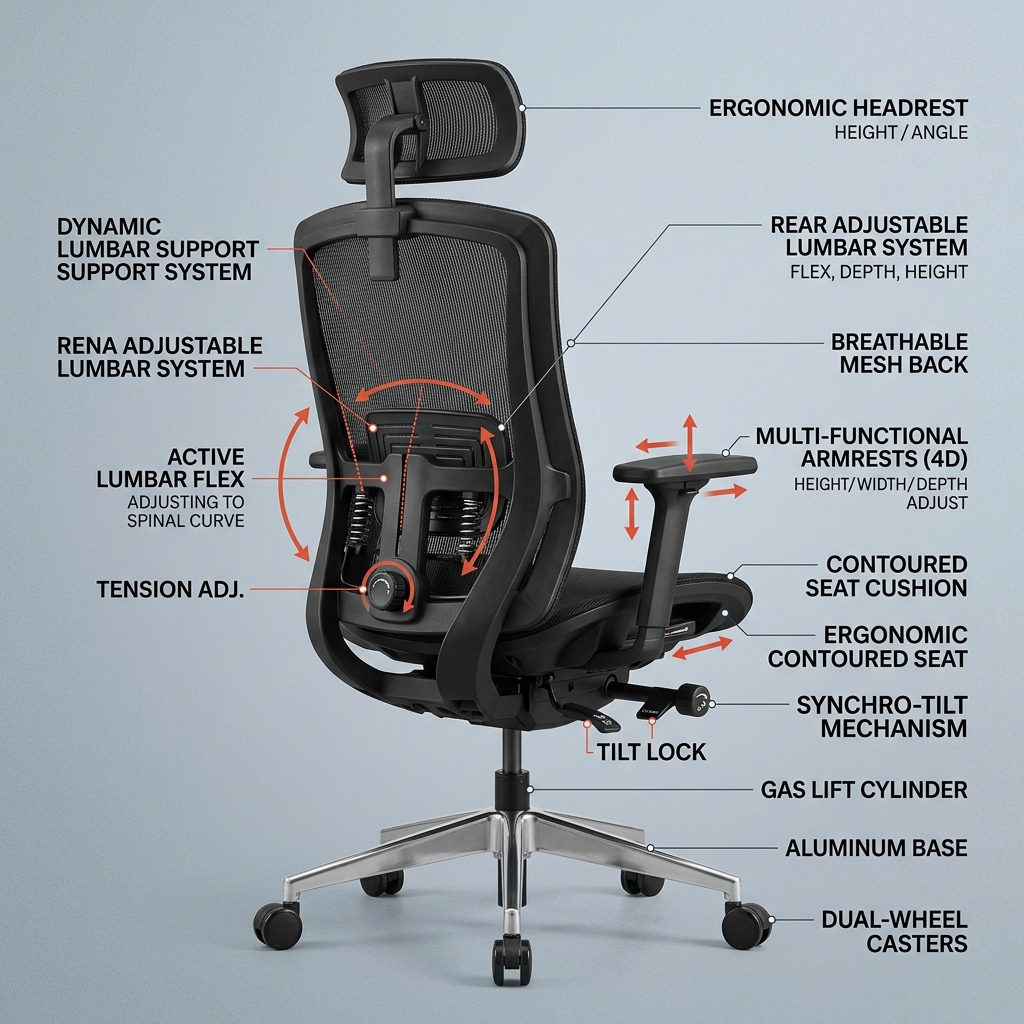
2. The Physics of Lumbar Support and Sacral Stabilization
Adequate lumbar support requires precise sacral stabilization. The sacrum acts as the foundation of the spine, and when it tilts backward, the lumbar vertebrae are forced into a flexed position. Ergonomic lumbar systems must apply continuous forward pressure to the sacral region to keep the pelvis upright. This dual-zone support mimics the body's natural standing posture, minimizing mechanical shear forces on the lower joints and protecting the lower back.
Passive lumbar supports, like simple mesh panels, compress under load and fail to provide the structural resistance needed to support the spine. Active systems use adjustable tension pads that allow you to customize the support to your spinal curve. This adjustment ensures that the support remains in contact with the spine as you move, preventing gaps that lead to slouching.
The contact surface area also plays a critical role in pressure distribution. A narrow lumbar pad concentrates forces in a small area, which can cause muscle bruising and discomfort. Wide, contoured lumbar supports distribute these forces over a larger area, ensuring comfortable support during long work sessions without restricting movement.
Material elasticity must match the natural flexibility of human tissues. Hybrid polymers provide firm support while flexing during torsional movements, such as reaching or turning. This balance of rigidity and flexibility is key to long-term comfort and joint protection, ensuring the chair adapts to your body.
- Stabilizes the sacral base to prevent posterior pelvic rotation.
- Uses adjustable tension systems to match individual spinal curves.
- Distributes support forces across a wide surface area to prevent bruising.
- Adapts dynamically to lateral and torsional body movements.
- Reduces stress on the posterior longitudinal ligament.
3. Kinematic Tilt Mechanisms and Dynamic Seating Dynamics
Dynamic seating is essential for spinal disc health. Intervertebral discs lack a direct blood supply and rely on a process called fluid imbibition to absorb nutrients and remove waste. This process requires movement, as changes in pressure pump fluids in and out of the discs. Tilt mechanisms allow the body to move naturally, promoting disc health and reducing stiffness during long shifts.
Modern kinematic mechanisms sync the movement of the seat pan and backrest. When you recline, the seat pan tilts at a lesser angle than the backrest, keeping your feet flat on the floor and maintaining a constant focal point. This configuration prevents the pelvis from sliding forward, which can cause poor posture and low back strain, ensuring comfort.
Tension control allows you to adjust the resistance of the tilt mechanism to your body weight. Proper adjustment enables you to transition smoothly between upright and reclined postures without muscle strain. This effortless movement encourages frequent posture changes, reducing muscle tension and fatigue throughout the day.
Reclining also transfers a portion of your body weight from the spine to the backrest, reducing spinal compression. Even a minor recline of 10 to 15 degrees can significantly reduce load, providing relief to tired back muscles and supporting recovery during short rest breaks.
- Promotes fluid imbibition to nourish intervertebral discs.
- Syncs seat and backrest angles to prevent pelvic sliding.
- Features adjustable tension to match support to user weight.
- Reduces spinal compression by transferring load to the backrest.
- Encourages active sitting and frequent posture changes.
4. Seat Pan Depth, Width, and Weight Distribution Mechanics
The seat pan is the primary load-bearing surface and must distribute weight evenly to prevent high pressure areas. If a seat is too deep, it presses against the back of the knees, restricting blood flow and forcing you to sit forward, losing lumbar support. Proper seat depth adjustment ensures a gap between the seat edge and the knees, supporting optimal circulation and comfort.
Seat width must accommodate different body types without restricting movement or causing hip pain. Contoured seat designs help distribute weight across the thighs and buttocks, reducing pressure on the ischial tuberosities. This design minimizes discomfort and the urge to shift positions constantly, supporting focused work.
Material choice affects both weight distribution and comfort. Elastomeric mesh suspensions distribute weight evenly and eliminate pressure points found in foam cushions. Mesh also allows air to circulate, preventing heat and moisture buildup that can cause skin irritation during long hours of use.
The waterfall front design is crucial for leg circulation. A curved front edge reduces pressure on the underside of the thighs, preventing numbness and vascular restriction during long sitting sessions. This design feature is essential for maintaining leg comfort and health.
- Features adjustable depth to prevent pressure behind the knees.
- Distributes weight across the thighs to protect the ischial tuberosities.
- Uses elastomeric mesh to eliminate pressure points.
- Waterfall front design supports healthy leg circulation.
- Prevents the user from sliding forward away from the lumbar support.
5. Adjustability and Customization Parameters for Spinal Alignment
Spinal alignment requires comprehensive adjustability across multiple components of the chair. Armrest height and width adjustment are essential for reducing strain on the shoulders and neck. When armrests are set correctly, the elbows rest at a 90-degree angle, allowing the shoulders to relax and preventing muscle tension in the upper back and neck.
Seat height adjustability ensures that the feet rest flat on the floor, keeping the thighs parallel to the ground. This position aligns the pelvis and reduces pressure on the back of the thighs. Height adjustment must use reliable pneumatic cylinders that maintain their setting without slipping under load.
Backrest height adjustability allows you to align the lumbar support with the curve of your lower back. This alignment is critical for effective support, as support placed too high or too low can worsen back pain. Easy-to-use controls make adjustment simple and precise, ensuring optimal alignment.
Headrest support is beneficial for tasks that require reclining, such as reading or viewing screens. A well-designed headrest supports the cervical spine, reducing neck muscle work and maintaining a neutral head position, preventing strain during rest breaks.
- Adjustable armrests support elbows and reduce shoulder strain.
- Pneumatic height adjustment aligns the pelvis and thighs.
- Backrest height adjustment aligns lumbar support with spinal curves.
- Optional headrest support protects the cervical spine.
- Allows customization to accommodate various body types.
6. Materials Science of Modern Office Seating Systems
Material quality determines the support and longevity of an ergonomic chair. Elastomeric polymers used in high-end mesh chairs maintain their tension and shape over years of use. These materials flex to distribute weight evenly, returning to their original shape when you stand, ensuring consistent support.
Polyurethane foam used in traditional cushions must have the right density to provide support without bottoming out. High-density foam contouring matches body shapes, providing comfortable support while preventing heat buildup. Low-quality foam degrades quickly, losing its supportive properties and comfort.
Structural frames must be strong and durable, using materials like cast aluminum or glass-reinforced nylon. These frames support the tilt mechanism and backrest, ensuring stability and safety under heavy loads, providing a reliable platform for work.
Breathable fabrics and mesh improve comfort by allowing heat and moisture to escape. Controlling the seating micro-climate prevents discomfort and helps maintain focus during long work hours, supporting overall productivity and wellness.
- Elastomeric mesh maintains tension and distributes weight.
- High-density polyurethane foam supports without bottoming out.
- Durable cast aluminum frames ensure structural stability.
- Breathable materials manage heat and moisture.
- Resists wear from daily use and cleaning cycles.
7. Clinical Recommendations for Office Setup and Ergonomics
A supportive chair is most effective when integrated into a complete ergonomic workstation. The monitor should be positioned directly in front of you, with the top of the screen at eye level. This placement prevents neck strain and head tilt, helping you maintain a neutral spine throughout the workday.
Keyboard and mouse should be positioned at a height that allows the wrists to remain straight and the elbows close to the body. This setup reduces strain on the forearms and wrists, helping prevent repetitive strain injuries like carpal tunnel syndrome.
Regular movement breaks are essential, even when using the best ergonomic chair. Standing, stretching, or walking for a few minutes every hour boosts circulation and reduces muscle fatigue, helping maintain energy and comfort, preventing stiffness.
Workspace lighting should minimize glare on the screen, which can cause eye strain and head tilt. Proper lighting setup supports comfortable posture and focus, reducing overall strain during long screen sessions.
- Positions monitor at eye level to prevent neck strain.
- Keyboard height keeps wrists straight and elbows close.
- Encourages regular movement breaks to boost circulation.
- Minimizes screen glare to support comfortable posture.
- Combines seating support with overall workstation ergonomics.
8. Long-Term Value and Economic Benefits of Ergonomic Chairs
Investing in a high-quality ergonomic chair delivers long-term financial and health benefits. Premium chairs are built to last, often featuring multi-year warranties that protect your investment. This durability reduces the need for frequent replacements, saving money over time, making it a wise choice.
Preventing back pain and discomfort improves productivity and focus, helping you work more efficiently. Reducing the risk of MSDs also lowers healthcare costs and time lost to injury, supporting overall wellness and career longevity.
High-quality materials and construction ensure that the chair maintains its supportive properties over its lifespan. This consistent performance provides reliable comfort and protection, making it a valuable addition to your workspace, supporting health.
A well-designed workspace also supports employee satisfaction and retention. Providing comfortable, supportive equipment demonstrates a commitment to health and wellness, fostering a positive work environment.
- Built to last with comprehensive manufacturer warranties.
- Improves productivity by reducing discomfort and fatigue.
- Lowers healthcare costs associated with musculoskeletal disorders.
- Maintains supportive properties over its entire lifespan.
- Demonstrates a commitment to health and wellness in the workplace.
9. Spinal Pathologies and Ergonomic Seating Considerations
Different spinal conditions require specific chair adjustments and features. For herniated discs, a chair with an adjustable kinematic tilt mechanism is beneficial, as it allows for frequent position changes that relieve pressure on the affected disc. The lumbar support must be positioned precisely to support the spine.
For spinal stenosis, a slight forward tilt or a seat that allows for a more open hip angle can reduce lower back stress. The chair should support a comfortable position that minimizes spinal canal compression, allowing for pain-free sitting.
Spondylolisthesis requires firm sacral and lumbar support to prevent forward slippage of the vertebrae. A highly adjustable chair allows you to find the right settings to support and protect the spine, reducing strain on the joints.
Consulting with a healthcare professional can help you identify the right ergonomic features for your specific condition. Proper setup and support can significantly manage pain and promote recovery, improving overall quality of life.
- Adjustable tilt mechanisms benefit herniated disc management.
- Open hip angles help reduce pain from spinal stenosis.
- Firm sacral support protects against vertebral slippage.
- Allows customization for specific spinal pathologies.
- Supports recovery and pain management in collaboration with medical advice.
10. Lumbar Traction and Decompression Seating Protocols
Lumbar traction is a therapeutic technique used to relieve back pain by creating space between the vertebrae. Certain advanced ergonomic chairs incorporate design features that simulate mild spinal decompression. By allowing for a controlled recline while maintaining firm lumbar support, the chair helps stretch the lower back muscles and reduce pressure on the discs.
This decompression effect supports recovery from disc issues and muscle spasms, providing relief during the workday. The recline angle must be adjusted to your comfort level, ensuring gentle traction without strain, promoting healing.
Using decompression settings during short breaks can help relieve stiffness and fatigue, restoring energy and focus. This active recovery support is a valuable feature for individuals with chronic back issues.
Integrating traction features into your seating routine supports overall spinal health, helping maintain flexibility and comfort throughout your career, ensuring a healthy, supportive work environment.
- Simulates mild spinal decompression to relieve pressure on discs.
- Controlled recline stretches lower back muscles to reduce spasms.
- Adjustable traction settings ensure gentle, comfortable relief.
- Supports active recovery breaks to manage back stiffness and fatigue.
- Promotes long-term spinal flexibility and joint comfort.
Clinical Recommendation & Audit
Upgrade your setup to maximize safety and wellness standards. Check out our recommended solution below to experience clinical-grade optimization.
Herman Miller Aeron Ergonomic Office Chair (Size B)
- PosturFit SL hardware for dynamic lumbar and sacral support customization
- 8Z Pellicle elastomeric mesh with eight distinct zones of tension for pressure relief
- Harmonic tilt mechanism mimics natural body pivot points for balanced motion
- Fully adjustable armrests and seat angle adjustment for optimal workspace alignment
Technical Specifications & Product Data
| Specification | Value / Details |
|---|---|
| Brand | Herman Miller |
| List Price | $1,895.00 (USD) |
| Customer Rating | 4.8 / 5.0 (6,820 reviews) |
| ASIN / Identifier | B01N9UPFSI |
| Availability | In Stock (USA Region) |
| Outbound Link Compliance | Sponsored & Nofollow Enforced |
Verified Features & Performance Data
- ✓PosturFit SL hardware for dynamic lumbar and sacral support customization
- ✓8Z Pellicle elastomeric mesh with eight distinct zones of tension for pressure relief
- ✓Harmonic tilt mechanism mimics natural body pivot points for balanced motion
- ✓Fully adjustable armrests and seat angle adjustment for optimal workspace alignment
System Sovereignty & Engineering
Edge Computing
100% Client-side processing. Your data never leaves your browser sandbox, ensuring absolute compliance with US privacy mandates.
Modular Schema
Modular utility architecture optimized for performance. Low-latency WASM kernels provide near-native speeds for complex transformations.
Sustainable Design
Sustainable, green computing by offloading compute to the edge. Verified zero-server storage (ZSS) for professional-grade security.